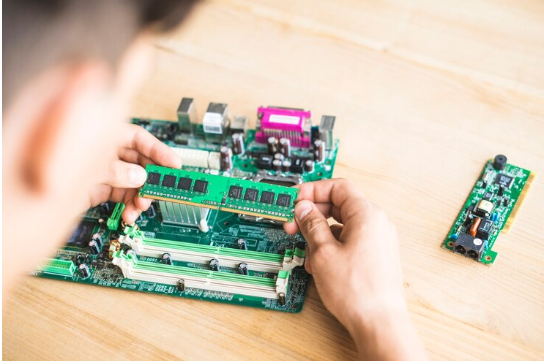

Buying computer memory online can make an upgrade easier, but the right module depends on more than its capacity. Before you Buy RAM Online, you need to check whether the memory matches your computer’s motherboard, processor, and existing RAM. Ram Exchange offers new, used, and refurbished RAM for different computer and IT needs, including older and newer memory types. A little research before placing an order can help you avoid compatibility problems, unnecessary returns, and memory that does not work with your system.
Check Your Computer’s RAM Type First
RAM is not a universal component. Different computers support different memory generations, and a module made for one generation may not work in a system designed for another.
Common generations include:
- DDR2 for many older computers
- DDR3 for older desktop and laptop systems
- DDR4 for many current and previous-generation computers
- DDR5 for newer systems with compatible motherboards
Check your computer or motherboard documentation before ordering. You can also use your operating system’s system information tools to find details about your installed memory.
Do not assume that newer RAM will automatically work in an older computer. DDR4 and DDR5, for example, have different physical designs and electrical requirements.
Know How Much RAM You Actually Need
RAM capacity affects how many applications your computer can handle at the same time. The right amount depends on how you use the system. A basic computer used for email, browsing, documents, and simple tasks may not need the same capacity as a computer used for editing, gaming, development, or other demanding work.
Consider your normal workload:
- Everyday browsing and office work may need a moderate amount of RAM.
- Gaming can benefit from additional memory, depending on the games and other hardware.
- Photo and video editing may require more memory for larger files and complex projects.
- Professional workstations can need higher-capacity modules for demanding applications.
More RAM is not always the answer to every performance issue. If the computer has a slow storage drive, an older processor, or another hardware limitation, adding memory may not solve the main problem.
Read More: There is nothing either good or bad, but thinking makes it so. Sometimes I can feel my bones straining under the weight of all the lives I’m not living. The greatest wealth is to live content with little.
Check the Form Factor
RAM comes in different physical sizes. Desktop computers generally use DIMM modules, while many laptops use smaller SO-DIMM modules. The two types are not interchangeable simply because they belong to the same DDR generation.
Before ordering, confirm:
- Desktop or laptop use
- DIMM or SO-DIMM format
- Number of memory slots
- Maximum supported capacity
- Supported RAM generation
This information is usually available in the motherboard or computer manufacturer’s specifications.
Compare RAM Speed and System Support
Memory speed is another specification that deserves attention. RAM may be listed with a speed rating, but your computer may support only certain speeds. For example, a motherboard may accept a faster memory module but operate it at a lower supported speed. In other cases, a module may not be supported at all.
Look at your system’s specifications before choosing a module. Pay attention to:
- Rated memory speed
- Supported speed range
- Motherboard compatibility
- Processor memory support
- Existing RAM specifications
Matching specifications can help prevent unexpected performance or compatibility issues.
Consider Capacity and Module Configuration
A computer may support a certain total RAM capacity, but the way that capacity is installed can also matter. Some systems perform better when memory is installed in matched pairs because of dual-channel or similar memory configurations. For example, two compatible 8GB modules can provide 16GB of total memory while allowing a supported system to use a dual-channel configuration. Before ordering, check how many slots your computer has and how much memory each slot can support.
A quick checklist can include:
- Total RAM currently installed
- Number of occupied slots
- Number of available slots
- Maximum supported RAM
- Recommended module configuration
Decide Between New, Used, and Refurbished RAM
Online sellers may offer new, used, rebuilt, or refurbished memory. Price differences can make used or refurbished modules attractive, especially for older systems. The condition of the module should be clear before purchase. A reliable seller should provide useful product details and explain the condition of the memory. Ram Exchange supplies new, used, and refurbished RAM across different generations and applications. Its product range includes legacy memory as well as DDR4 and DDR5 modules.
When comparing listings, check:
- Memory condition
- Capacity
- DDR generation
- Speed rating
- Module type
- Warranty or return terms
A lower price is less useful if the module does not match your computer.
Pay Attention to ECC and Non-ECC Memory
Some computers require ECC memory, while many consumer desktops and laptops use non-ECC RAM. ECC memory is designed to detect and correct certain types of memory errors and is commonly associated with servers and professional systems. These memory types should not be treated as interchangeable. If you are buying RAM for a workstation, server, or business system, check whether the platform requires:
- ECC or non-ECC memory
- Registered or unbuffered RAM
- A specific memory density
- A particular module configuration
Check the Seller’s Product Information
A detailed product listing can make online RAM shopping much easier. Computer memory products should include more than just a capacity number, so check the listing for key specifications such as memory generation, speed, module type, and compatibility before placing an order.
Look for information such as:
- RAM generation
- Capacity per module
- Speed
- Module type
- ECC status
- Manufacturer or part number
- Condition
- Warranty information
Part numbers can also be useful when replacing an existing module. Searching by the exact part number can help you find a matching or compatible component. For buyers who need older memory, product availability can also matter. Companies such as Ram Exchange handle both legacy and current DRAM products, which can be useful when a computer requires an older memory generation.
Think About Warranty and Returns
RAM is relatively easy to install, but compatibility problems can still happen. A clear warranty and return policy gives you an option if the module arrives with a fault or does not match the stated specifications.
Before ordering, review:
- Warranty length
- Return period
- Conditions for returns
- Testing or replacement process
- Shipping terms
Keep the original packaging and order information until you have tested the memory properly.
Check Your Existing RAM Before Ordering
If you are adding RAM instead of replacing all existing memory, check the specifications of the modules already installed. Mixing different capacities or speeds can sometimes work, but the system may operate according to the limits of the slower or more restricted module. Some computers also have specific rules about which slots should be populated. Write down the details of your current RAM before shopping. A system information tool, BIOS screen, or existing module label may provide useful details.
For example, record:
- Capacity
- DDR generation
- Speed
- Module type
- Manufacturer
- Part number
These details make it easier to compare potential replacements.
Do Not Ignore the Computer’s Maximum RAM Limit
Every motherboard or computer platform has a maximum supported memory capacity. Installing more RAM than the system can recognize may result in unused capacity. The maximum can depend on the motherboard, processor, operating system, and number of available slots. Checking this before buying prevents unnecessary spending. It also helps you choose a practical upgrade rather than simply selecting the largest module available.
Make Your RAM Purchase With the Specifications in Front of You
The safest way to Buy RAM Online is to treat compatibility as the first requirement, not an afterthought. Capacity, DDR generation, form factor, speed, ECC type, slot configuration, and system limits all deserve a quick check before ordering. Computer memory products can vary widely even when they appear similar in a product listing. Taking a few minutes to compare the specifications with your computer’s requirements can make the buying process much simpler. Before placing your order, check your computer’s RAM type, capacity, speed, and compatibility. Need help finding compatible memory for your system? Contact us today with your computer or RAM details and get guidance on suitable options.